https://youtu.be/cH36yhuGDxQ
Showing posts with label Web Services. Show all posts
Showing posts with label Web Services. Show all posts

About Simple Object Access Protocol (SOAP)
• It's a wire protocol.
• It's an RPC mechanism.
• It's an interoperability standard.
• It's a document exchange protocol.
• It's a universal business-to-business communications language.
• SimpleObject Access Protocol – //www.w3c.org/TR/SOAP/
• A lightweight protocol for exchange of information in a decentralized, distributed environment.
• Two different styles to use: – to encapsulate RPC calls using the extensibility and flexibility
of XML. – to deliver a whole document without any method calls encapsulated
XML messaging using SOAP
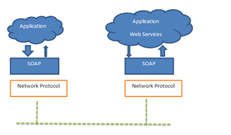
SOAP specification
• The SOAP specification describes four major components: Formatting conventions for encapsulating data. Ex: SOAP envelope, header, body etc., Routing directions in the form of an envelope, a transport or protocol binding, Ex: SOAP sender , receiver etc., Encoding rules An RPC mechanism
• The envelope defines a convention for describing the contents of a message, which in turn has implications on how it gets processed.
• A protocol binding provides a generic mechanism for sending a SOAP envelope via a lower level protocol such as HTTP.
• Encoding rules provide a convention for mapping various application data types into an XML tag-based representation.
• Finally, the RPC mechanism provides a way to represent remote procedure calls and their return values.
SOAP Message Structure

Block structure of a SOAP envelope

SOAP Request Envelope:
<soapenv:Envelope xmlns:soapenv="//schemas.xmlsoap.org/soap/envelope/" xmlns:q0="//emp" xmlns:xsd="//www.w3.org/2001/XMLSchema" xmlns:xsi="//www.w3.org/2001/XMLSchema-instance">
<soapenv:Body>
<q0:getName>
<q0:sName>Vinod Kumar</q0:sName>
</q0:getName>
</soapenv:Body>
</soapenv:Envelope>
SOAP Response Envelope:
<soapenv:Envelope xmlns:soapenv="//schemas.xmlsoap.org/soap/envelope/" xmlns:xsd="//www.w3.org/2001/XMLSchema" xmlns:xsi="//www.w3.org/2001/XMLSchema-instance">
<soapenv:Body>
<getNameResponse xmlns="//emp">
<getNameReturn>Welcome Vinod Kumar</getNameReturn>
</getNameResponse>
</soapenv:Body>
</soapenv:Envelope>
SOAP Structure
• A SOAP message is contained in an envelop.
• The envelop element in turn contain (in order)
– An optional header with one or more child entries.
– A body element that can contain one or more child entries.
These child entries may contain arbitrary XML data.
Adding Header
<SOAP-ENV:Header>
<jaws:MessageHeader xmlns:jaws="urn:training-samples">
<From>Me</From>
<To>You</To>
<MessageId>9999</MessageId>
</jaws:MessageHeader>
</SOAP-ENV:Header>
SOAP Headers
• Headers are really just extension points where you can include elements from other namespaces.
– i.e., headers can contain arbitrary XML.
• Header entries may optionally have a “mustUnderstand” attribute.
– mustUnderstand=1 means the message recipient must process the header element.
– If mustUnderstand=0 or is missing, the header element is optional.
SOAP Body
Body entries are really just placeholders for arbitrary XML from some other namespace.
• The body contains the XML message that you are transmitting.
• The message format is not specified by SOAP.
– The <Body></Body> tag contains actual XML message.
– The recipient decides what to do with the message.
e.g:-
<soapenv:Body>
<getNameResponse xmlns="//emp">
<getNameReturn>Welcome Vinod Kumar</getNameReturn>
</getNameResponse>
</soapenv:Body>
SOAP RPC Example
A simple example
– Calls with a string public String hello(String name)
– Returns a greeting “Hi!” + name

About Web Services Definition Language (WSDL)
• WSDL-Service Description:
Service Description carries information about the service such as the input or output parameter, the location of the service, port type, binding information, and so on.
• Web Services Definition Language
– http://www.w3.org/TR/wsdl/
• An XML-based language for describing Web Services
– what the service does (description)
– how to use it (method signatures)
– where to find the service
• It does not depend on the underlying protocol
• WSDL is an XML grammar for describing a web service as a collection of access endpoints.
• Capable of exchanging messages in a procedure or document-oriented fashion.
• A WSDL document is a recipe used to automate the details involved in application-to-application communication.
Anatomy of a WSDL Document
The following code shows the major elements that may appear in a WSDL document.
An asterisk (*) next to an element indicates that more than one of these elements may appear.
<definitions>
<import>*<types><schema></schema>*</types>
<message>*<part></part>*</message>
<PortType>*
<operation>*<input></input><output></output><fault></fault>*
</operation>
</PortType>
<binding>*<operation>*<input></input><output></output>
</operation>
</binding>
<service>*<port></port>*</service>
</definitions >
WSDL Elements
• Types – will give namespace and schema location.
• Message - Request/response messages.
• Operation - Name of operation.
• Port Type – Actual WebService.
• Binding – Binds on particular port.
• Port - URL of WS on which it is running.
• Service – web Service.
<definitions> Element
The <definitions> element in a WSDL document acts as a
container for the service description.
It provides a place to do global declarations of namespaces
that are intended to be visible throughout the rest of the
document.
<definitions targetNamespace="urn:3950" xmlns="http://schemas.xmlsoap.org/wsdl/"
xmlns:xsd="http://www.w3.org/2001/XMLSchema" xmlns:soap="http://schemas.xmlsoap.org/wsdl/soap/" xmlns:soapenc="http://schemas.xmlsoap.org/soap/encoding/ “ xmlns:tns="urn:3950">
<import> Element
The <import> element serves a purpose similar to the #include directive in the C/C++ programming language.After the <definitions> element, we see an <import> element:
<definitions targetNamespace="urn:3950" xmlns="http://schemas.xmlsoap.org/wsdl/"
xmlns:xsd="http://www.w3.org/2001/XMLSchema" xmlns:soap="http://schemas.xmlsoap.org/wsdl/soap/"
xmlns:soapenc="http://schemas.xmlsoap.org/soap/encoding/“ xmlns:tns="urn:3950">
<import namespace="https://asf.gils.net/xer" location="https://asf.gils.net/xer/ez.xsd"/>
<types> Element
• The <types> element in a WSDL document acts as a container for defining the data types used in <message> elements.
• <message> elements define the format of messages interchanged between a client and a web service.
• The <types> element has zero or more <schema> sub elements.
<message> Element
• The <message> element is used to model the data exchanged as part of a web service.
• <message> elements reference the types defined in the <types> section.
• A message consists of one or more <part> subelements.
• A <part> subelement identifies the individual pieces of data that are part of this data message and the datatypes that the pieces adhere to.
<portType> Element
• The <portType> element specifies a subset of operations supported for an endpoint of a web service.
• In a sense, a <portType> element provides a unique identifier to a group of actions that can be executed at a single endpoint
<binding> Element
A <binding> element is a concrete protocol and data format specification for a <portType>element.
It is where you would use one of the standard binding extensions-HTTP, SOAP, or MIME-or create one of your own.
<service> Element
The <service> element typically appears at the end of a WSDL document and identifies a web service.
<?xml version="1.0" encoding="UTF-8"?>
<wsdl:definitions targetNamespace="http://emp" mlns:apachesoap="http://xml.apache.org/xml-soap" xmlns:impl="http://emp" xmlns:intf="http://emp" xmlns:wsdl="http://schemas.xmlsoap.org/wsdl/" xmlns:wsdlsoap="http://schemas.xmlsoap.org/wsdl/soap/" xmlns:xsd="http://www.w3.org/2001/XMLSchema">
<!--WSDL created by Apache Axis version: 1.4 Built on Apr 22, 2006 (06:55:48 PDT)-->
<wsdl:types>
<schema elementFormDefault="qualified" targetNamespace="http://emp" xmlns="http://www.w3.org/2001/XMLSchema">
<element name="getName">
<complexType>
<sequence>
<element name="sName" type="xsd:string"/>
</sequence>
</complexType>
</element>
<element name="getNameResponse">
<complexType>
<sequence>
<element name="getNameReturn" type="xsd:string"/>
</sequence>
</complexType>
</element> </schema> </wsdl:types>
<wsdl:message name="getNameResponse">
<wsdl:part element="impl:getNameResponse" name="parameters"/>
</wsdl:message>
<wsdl:message name="getNameRequest">
<wsdl:part element="impl:getName" name="parameters"/>
</wsdl:message>
<wsdl:portType name="employee">
<wsdl:operation name="getName">
<wsdl:input message="impl:getNameRequest" name="getNameRequest"/>
<wsdl:output message="impl:getNameResponse" name="getNameResponse"/>
</wsdl:operation>
</wsdl:portType>
<wsdl:binding name="employeeSoapBinding" type="impl:employee">
<wsdlsoap:binding style="document" transport="http://schemas.xmlsoap.org/soap/http"/>
<wsdl:operation name="getName">
<wsdlsoap:operation soapAction=""/>
<wsdl:input name="getNameRequest">
<wsdlsoap:body use="literal"/>
</wsdl:input>
<wsdl:output name="getNameResponse">
<wsdlsoap:body use="literal"/>
</wsdl:output>
</wsdl:operation>
</wsdl:binding>
<wsdl:service name="employeeService">
<wsdl:port binding="impl:employeeSoapBinding" name="employee">
<wsdlsoap:address location="http://localhost:8080/employee/services/employee"/>
</wsdl:port>
</wsdl:service>
</wsdl:definitions>
Web Service Request/ Response


JAX-WS Stand Alone Web Services Using JDK1.6 Wsimport Utility Client
In this tutorial we will learn, how to create JAX-WS client by wsimport utility:
Requirements:
1. Java 1.6+
2. Eclipse
3. Windows OS or any.
4. You have already followed my first example for writing the service calss and all from click or video MathService using wsgen utility
Open the eclipse
Create the new project as java project.
File > New > Java Project.
Enter the project name: Stand-Alone-Web-Services-Using-JDK1.6-WsImport-Utility-JAXWS-Client
Java project will created in with src and JRE System Library
Note: assuming you have publish the earlier project Math Service and you will able to access the wisdl by any browser, URL > http://localhost:8888/webservice/www.tutorialbyexample.com?wsdl
and getting the wsdl as response.
if not then follow the previous project first, Click me
Now open the command prompt.
Change the dir: cd C:\workspace\Stand-Alone-Web-Services-Using-JDK1.6-WsImport-Utility-JAXWS-Client
and type the command:
C:\workspace\Stand-Alone-Web-Services-Using-JDK1.6-WsImport-Utility-JAXWS-Client>wsimport -s src -keep -d class http://localhost:8888/webservice/www.t
utorialbyexample.com?wsdl
Press enter, now your client supporting code will generated, like wise below screen.

Write the client code:
Right click on the src under project Stand-Alone-Web-Services-Using-JDK1.6-WsImport-Utility-JAXWS-Client.
Click New > Class.
Enter the package name:com.tutorialbyexample.mathservice.client
Enter the Class name:MathServiceClient
MathServiceClient.java code will look like:
packagecom.tutorialbyexample.mathservice.client;
importcom.tutorialbyexample.mathservice.MathService;
importcom.tutorialbyexample.mathservice.MathServiceService;
public class MathServiceClient {
public MathServiceClient() {
// TODO Auto-generated constructor stub
}
public static void main(String[] args) {
//
MathServiceService objMathServiceService = newMathServiceService();
MathService objMathService = objMathServiceService.getMathServicePort();
System.out.println(objMathService.add(10, 40));
}
}
Hole project directory and file will look like:

Run the MathServiceClient client.
Right click on the MathServiceClient > Run as > Java Application.
Output will appear on the console:
50.0
All done form my end, try at your end. Put your point of view if any.
Have a good day ahead!!
JAX Web Services end to end examples (Server & Client code, Tomcat & Eclipse)
Requirements:
JDK 1.6 or 1.6+
Eclipse
Tomcat 6

Let’s start one by one step to achieve it:
Step : Create a Dynamic Web project in Eclipse
Open the eclipse by double click on the eclipse – Shortcut
File > New > Dynamic Web project
Project Name: jaxwsprojectineclipse
Target runtime: Apache Tomcat v6.0
Dynamic web module version: 2.5
Click Next
Click Next
Select or check: Generate web.xml deployment descriptor
Click on the Finish.
Step : Create the GreetingWebService.java service interface
Right click on the src folder located under jaxwsprojectineclipse > Java Resource
Select New
Select Interface
Name : GreetingWebService
Package : com.tutorialbyexample.webservicejaxws
Click on the Finish
Copy and pest below code:
GreetingWebService.java
package com.tutorialbyexample.webservicejaxws;
import javax.jws.WebMethod;
import javax.jws.WebParam;
import javax.jws.WebService;
import javax.jws.soap.SOAPBinding;
import javax.jws.soap.SOAPBinding.Style;
/**
* @author Vinod Kumar Web Service endpoint interface
*/
@WebService
@SOAPBinding(style = Style.DOCUMENT)
public interface GreetingWebService {
/**
* sayWelcome with parameter as string
*/
@WebMethod
String sayWelcome(@WebParam(name = "sName") String sName);
}
Step : Create the GreetingWebServiceImpl.java service interface
Right click on the src folder located under jaxwsprojectineclipse > Java Resource
Select New
Select class
Name : GreetingWebServiceImpl
Package : com.tutorialbyexample.webservicejaxws
Click on the Finish
Copy and pest below code:
GreetingWebServiceImpl.java
package com.tutorialbyexample.webservicejaxws;
import javax.jws.WebService;
import com.tutorialbyexample.webservicejaxws.GreetingWebService;
/**
*
* @author Vinod Kumar This is service implementation class
*/
@WebService(endpointInterface = "com.tutorialbyexample.webservicejaxws.GreetingWebService")
public class GreetingWebServiceImpl implements GreetingWebService {
@Override
public String sayWelcome(String sName) {
return "Welcome " + sName + " !";
}
}
Step : Add/update the deployment descriptor sun-jaxws.xml and web.xml
Right click on the WebContent folder located under jaxwsprojectineclipse
Select New
Others
Type XML
Select XML File
Next
Type the file name: sun-jaxws.xml
Click on the Finish
Copy and pest sun-jaxws.xml:
<?xml version="1.0"encoding="UTF-8"?>
version="2.0">
<endpoint name="GreetingWebService"
implementation="com.tutorialbyexample.webservicejaxws.GreetingWebServiceImpl"
url-pattern="/GreetingWebService"/>
</endpoints>
Update/Add the require line in web.xml
<?xml version="1.0"encoding="UTF-8"?>
<web-app xmlns:xsi="http://www.w3.org/2001/XMLSchema-instance"xmlns="http://java.sun.com/xml/ns/javaee"xsi:schemaLocation="http://java.sun.com/xml/ns/javaee http://java.sun.com/xml/ns/javaee/web-app_3_0.xsd" id="WebApp_ID" version="3.0">
<display-name>jaxwsprojectineclipse</display-name>
<listener>
<listener-class>
com.sun.xml.ws.transport.http.servlet.WSServletContextListener
</listener-class>
</listener>
<servlet>
<servlet-name>GreetingWebService</servlet-name>
<servlet-class>
com.sun.xml.ws.transport.http.servlet.WSServlet
</servlet-class>
</servlet>
<servlet-mapping>
<servlet-name>GreetingWebService</servlet-name>
<url-pattern>/GreetingWebService</url-pattern>
</servlet-mapping>
</web-app>
Step : Write the WebServicesClient.jav client code
Right click on the src folder located under jaxwsprojectineclipse > Java Resource
Select New
Select class
Name : WebServicesClient
Package : com.tutorialbyexample.webservicejaxws.client
Click on the Finish
Copy and pest below code:
WebServicesClient.java
package com.tutorialbyexample.webservicejaxws.client;
import java.net.MalformedURLException;
import java.net.URL;
import javax.xml.namespace.QName;
import javax.xml.ws.Service;
import com.tutorialbyexample.webservicejaxws.GreetingWebService;
/**
*
* @author Vinod Kumar This is service implementation class
*/
public class WebServicesClient {
public static void main(String[] args) throws MalformedURLException {
URL url = new URL(
// argument first, refer from wsdl
// argument second, refer from wsdl
QName qname = new QName(
"GreetingWebServiceImplService");
Service service = Service.create(url, qname);
GreetingWebService hello = service.getPort(GreetingWebService.class);
System.out.println(hello.sayWelcome("Vinod Kumar"));
}
}
Step : Write the client as jsp file WSClientJSP.jsp
Right click on the WebContent folder located under jaxwsprojectineclipse
Select New
Others
Type JSP
Select JSP file
Next
Type the file name: WSClientJSP.jsp
Click on the Finish
Copy and pest below code WSClientJSP.jsp:
<%@ pagelanguage="java" contentType="text/html; charset=ISO-8859-1"
pageEncoding="ISO-8859-1"%>
<%@ page
import="java.net.URL,javax.xml.namespace.QName,javax.xml.ws.Service,com.tutorialbyexample.webservicejaxws.GreetingWebService"%>
<!DOCTYPE htmlPUBLIC "-//W3C//DTD HTML 4.01 Transitional//EN" "http://www.w3.org/TR/html4/loose.dtd">
<html>
<head>
<meta http-equiv="Content-Type"content="text/html; charset=ISO-8859-1">
<title>Insert title here</title>
</head>
<body>
<%
URL url = new URL(
// argument first, refer from wsdl
// argument second, refer from wsdl
"GreetingWebServiceImplService");
Service service = Service.create(url, qname);
GreetingWebService hello = service
.getPort(GreetingWebService.class);
out.println(hello.sayWelcome("Vinod Kumar"));
%>
</body>
</html>
Step: Deploy war file jaxwsprojectineclipse .war in Tomcat
Right click on the jaxwsprojectineclipse
Select Export
Select WAR File
Let it be Web Project Name : jaxwsprojectineclipse
Select or Type the Destination: C:\Tomcate\apache-tomcat-6.0.39\webapps\jaxwsprojectineclipse.war
Note: This is the location of current tomcat installation directory.
Select or check
Export Source files
Overwrite existing file
Click the Finish
jaxwsprojectineclipse.war war file will create in Tomcat C:\Tomcate\apache-tomcat-6.0.39\webapps\
Step: Start the Tomcat
Open the Tomcat installation directory C:\Tomcate\apache-tomcat-6.0.39\bin
Double click on the startup.bat file
Tomcat will start:
INFO: Starting Coyote HTTP/1.1 on http-8080
org.apache.jk.common.ChannelSocket init
INFO: JK: ajp13 listening on /0.0.0.0:8009
org.apache.jk.server.JkMain start
INFO: Jk running ID=0 time=0/13 config=null
org.apache.catalina.startup.Catalina start
INFO: Server startup in 1441 ms
Step: Verify the deploy web services by WSDL file
Open the any web browser and type the end point url
Output:
<?xml version="1.0" encoding="UTF-8" ?>
- <!--
Published by JAX-WS RI (http://jax-ws.java.net). RI's version is JAX-WS RI 2.2.10 svn-revision#919b322c92f13ad085a933e8dd6dd35d4947364b.
-->
- <!--
Generated by JAX-WS RI (http://jax-ws.java.net). RI's version is JAX-WS RI 2.2.10 svn-revision#919b322c92f13ad085a933e8dd6dd35d4947364b.
-->
- <definitions xmlns:wsu="http://docs.oasis-open.org/wss/2004/01/oasis-200401-wss-wssecurity-utility-1.0.xsd" xmlns:wsp="http://www.w3.org/ns/ws-policy" xmlns:wsp1_2="http://schemas.xmlsoap.org/ws/2004/09/policy" xmlns:wsam="http://www.w3.org/2007/05/addressing/metadata" xmlns:soap="http://schemas.xmlsoap.org/wsdl/soap/" xmlns:tns="http://webservicejaxws.tutorialbyexample.com/" xmlns:xsd="http://www.w3.org/2001/XMLSchema" xmlns="http://schemas.xmlsoap.org/wsdl/" targetNamespace="http://webservicejaxws.tutorialbyexample.com/" name="GreetingWebServiceImplService">
- <types>
- <xsd:schema>
<xsd:importnamespace="http://webservicejaxws.tutorialbyexample.com/" schemaLocation="http://localhost:8080/jaxwsprojectineclipse/GreetingWebService?xsd=1" />
</xsd:schema>
</types>
- <message name="sayWelcome">
<partname="parameters" element="tns:sayWelcome" />
</message>
- <message name="sayWelcomeResponse">
<partname="parameters" element="tns:sayWelcomeResponse" />
</message>
- <portType name="GreetingWebService">
- <operation name="sayWelcome">
<inputwsam:Action="http://webservicejaxws.tutorialbyexample.com/GreetingWebService/sayWelcomeRequest" message="tns:sayWelcome" />
<outputwsam:Action="http://webservicejaxws.tutorialbyexample.com/GreetingWebService/sayWelcomeResponse" message="tns:sayWelcomeResponse" />
</operation>
</portType>
- <binding name="GreetingWebServiceImplPortBinding" type="tns:GreetingWebService">
<soap:bindingtransport="http://schemas.xmlsoap.org/soap/http" style="document" />
- <operation name="sayWelcome">
<soap:operationsoapAction="" />
- <input>
<soap:bodyuse="literal" />
</input>
- <output>
<soap:bodyuse="literal" />
</output>
</operation>
</binding>
- <service name="GreetingWebServiceImplService">
- <port name="GreetingWebServiceImplPort" binding="tns:GreetingWebServiceImplPortBinding">
<soap:addresslocation="http://localhost:8080/jaxwsprojectineclipse/GreetingWebService" />
</port>
</service>
</definitions>
Step: Verify the deploy services with WSClientJSP.jsp
Open the any browser and type the: http://localhost:8080/jaxwsprojectineclipse/WSClientJSP.jsp
Output:
Welcome Vinod Kumar !
Step: Verify the deploy web services by DII client
Right click on the WebServicesClient.java file located under jaxwsprojectineclipse > Java Resource
Select Run As
Select Java Application
Output will there in Console
com.sun.xml.internal.ws.model.RuntimeModeler getRequestWrapperClass
INFO: Dynamically creating request wrapper Class com.tutorialbyexample.webservicejaxws.jaxws.SayWelcome
com.sun.xml.internal.ws.model.RuntimeModeler getResponseWrapperClass
INFO: Dynamically creating response wrapper bean Class com.tutorialbyexample.webservicejaxws.jaxws.SayWelcomeResponse
Welcome Vinod Kumar !
Please like and share it!!!
Subscribe to:
Posts (Atom)